Typography Scale
UI UX Principles
Figma
UI Foundations
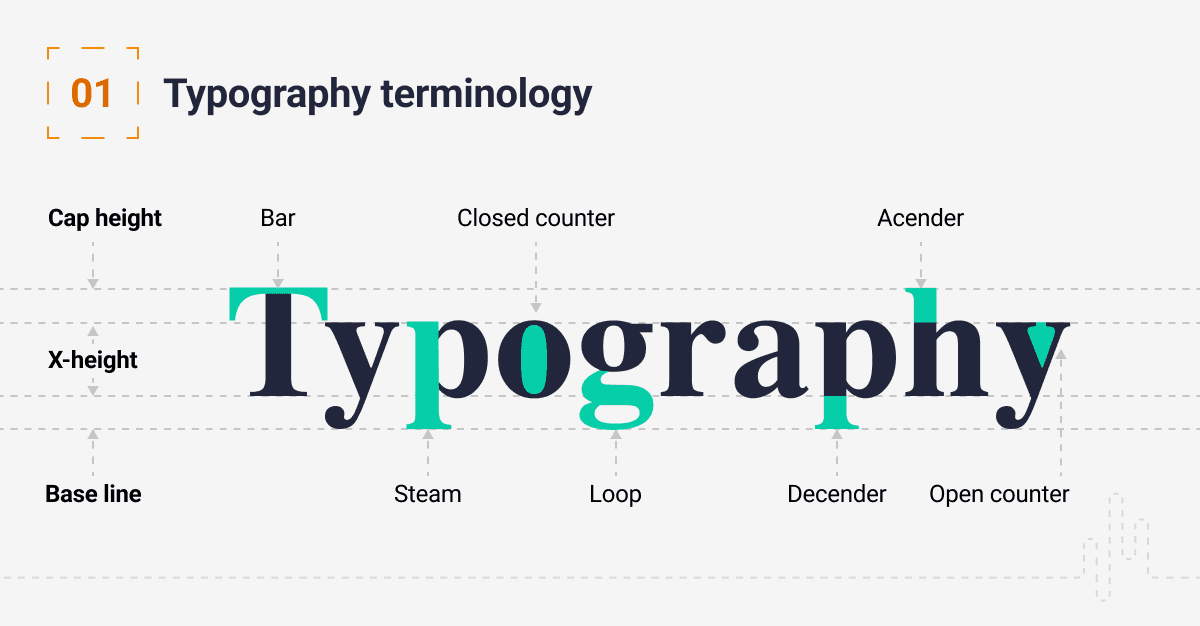
What is a Typography Scale?
A typography scale is a mathematical formula used to determine font sizes across your user interface. Choosing font sizes based on visual guesswork leads to chaotic layouts and poor reading experiences. By using a strict multiplier scale, you ensure that headings (H1, H2, H3) and body text follow a natural visual rhythm.
Why Should You Use It?
Clear Reading Order: Proper proportional scaling guides the user's eyes naturally from the most critical heading down to the body content.
Proportional Balance: Using mathematical scales balances out spacing issues, ensuring text containers look proportional across all breakpoints.
Systematic Choices: It eliminates endless decision-making loops because every single text layer size maps back to a fixed formula pattern.
How to Apply It in Figma
Choose Your Base Size: Start with a standard readable body font size, which is typically 16px for web platforms.
Apply a Scale Factor: Choose a fixed multiplier geometric ratio like the Major Third (1.250) or Perfect Fourth (1.333). Multiply your base size consistently to calculate heading tokens (e.g., 16px * 1.25 = 20px, 20px * 1.25 = 25px).
Set Proper Line-Heights: Always pair your font sizes with percentage-based or pixel-locked line-height values divisible by 4 or 8 to match the layout baseline grid.
📘 Designer Takeaways
The Core Rule: Avoid picking font sizes randomly. Establish a clear type scale system using fixed mathematical multipliers to anchor your visual hierarchy.
Efficiency Focus: Locking text tokens inside global Figma styles enables quick design updates without manually fixing individual layers later.
Ready Frameworks: For pre-calculated type matrices and font token structures, the Design Mastery Handbook provides production-grade system outlines across its 550+ pages.