UI/UX Design
Design Systems
Figma Tutorial
UI Foundations
Figma Auto Layout
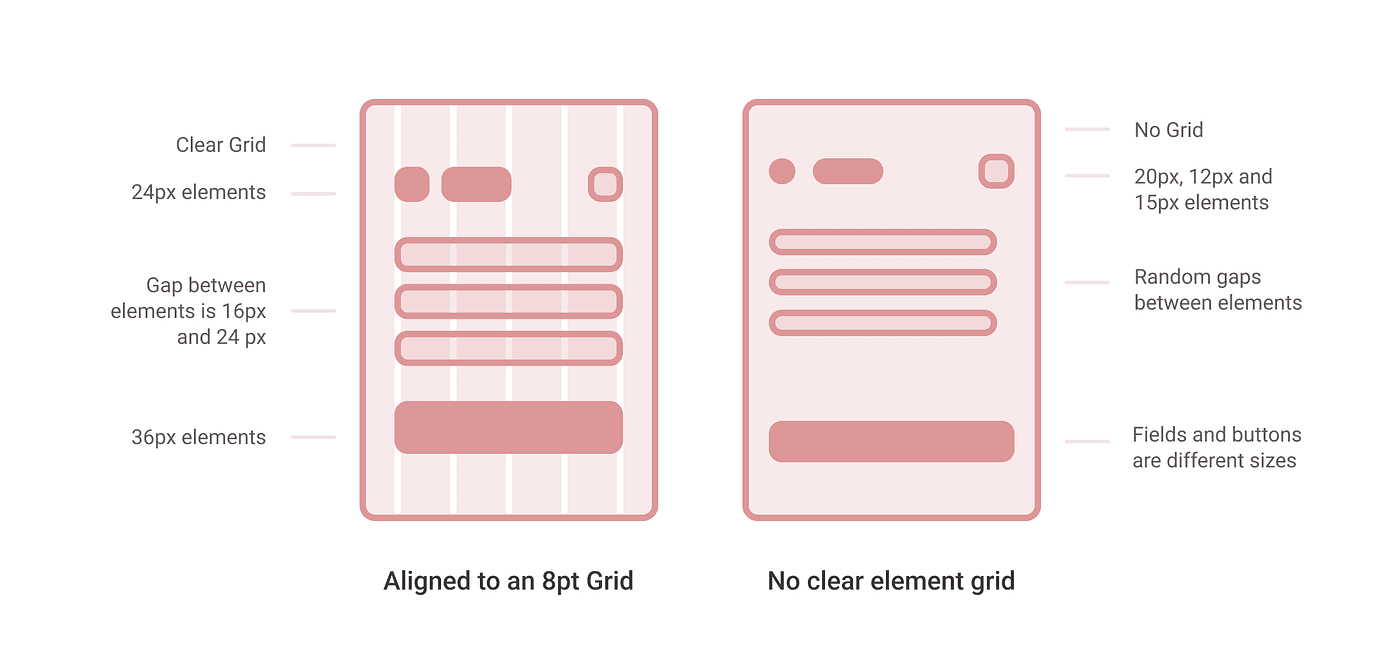
What is the 8pt Spacing Scale?
The 8pt spacing system means you use multiples of 8 for all your padding, margins, gaps, and component heights. Instead of picking random pixel values, your layout scale looks like this: 8, 16, 24, 32, 48, 64, 80, 96.
Why Should You Use It?
Consistency: When every element follows the same mathematical rule, your entire interface looks balanced automatically.
No Blurry Pixels: Most digital screen resolutions are divisible by 8. Using this scale prevents sub-pixel rendering bugs, keeping your design edges sharp.
Easy Developer Handoff: Frontend frameworks use default spacing scales based on 4px or 8px loops. Using this grid makes it easy for developers to turn your design into code.
How to Apply It in Figma
Set Big Nudge to 8px: Go to Figma Preferences > Nudge Amount. Set the Big Nudge to
8px. Now, holdingShift + Arrow Keywill move components perfectly on the grid.
Lock Auto Layout: When building elements like buttons or listing cards, stick strictly to the numbers in your scale (e.g., 8px vertical padding, 16px horizontal padding).
Fix Typography Line Heights: Always match your font line-heights to numbers divisible by 4 or 8 so your text lines align with the grid container layout.
📘 Designer Takeaways
The Core Rule: Never eyeball your padding or gaps. Enforce a strict mathematical system like the 8pt scale (8, 16, 24, 32, 48) to keep your layouts looking premium and balanced.
Handoff Efficiency: Standardizing your spacing directly maps to frontend production code (like Tailwind tokens), which cuts down back-and-forth dev loops and rendering alignment bugs.
Ready Frameworks: If you prefer to skip creating layout grids from scratch, the Design Mastery Handbook provides production-grade system frameworks pre-configured for instant client projects.